Loading

Loading
Control payment methods with powerful conditional logic. Show, hide, or restrict payment gateways based on cart contents, customer roles, shipping methods, order totals, locations, and more—all without coding.

Create smart payment gateway rules based on products, categories, customer roles, shipping methods, and cart conditions.
Set minimum and maximum order amounts to control when payment methods are available.
Offer personalized payment options for wholesalers, members, and different customer groups.
Automatically enable or disable gateways when specific products or categories are in the cart.
Show relevant payment methods based on the customer's selected shipping option.
Manage all payment conditions from a simple, user-friendly dashboard without coding.
Start with the powerful free version or unlock advanced payment automation with Pro. Compare features and choose the edition that best fits your WooCommerce business requirements.
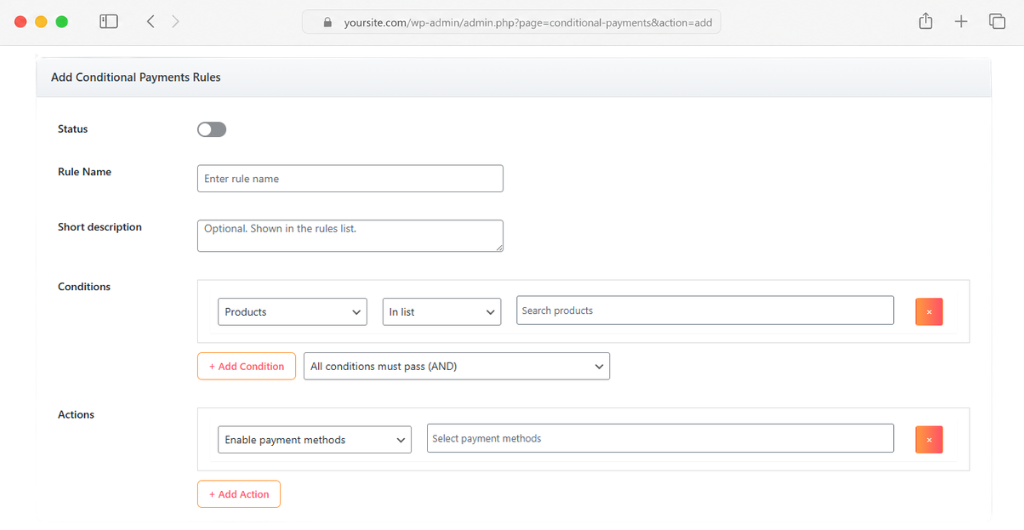
Take a look at the rule builder, settings panel, and checkout conditions that make Beep Conditional Payments the easiest way to manage WooCommerce payment gateways.
Start with the free version and upgrade when you need more advanced payment automation. Whether you're running a single store or managing multiple client sites, there's a plan designed to fit your business.
Perfect for getting started with payment gateway conditions.
Ideal for growing WooCommerce stores that need advanced checkout control.
Ideal for growing WooCommerce stores that need advanced checkout control.
Learn how to create powerful WooCommerce payment rules with ease. From installation guides to advanced configuration tutorials, our resources help you get the most out of Beep Conditional Payments.
Access detailed step-by-step guides covering every aspect of Beep Conditional Payments. Whether you're setting up your first payment rule or configuring advanced conditions, our documentation has you covered.
Follow along with practical video tutorials and walkthroughs designed for WooCommerce store owners, developers, and agencies. Learn how to build powerful payment workflows in minutes.
Find answers to the most common questions about Beep Conditional Payments. Learn how the plugin works, what features are available, and how it can help you create smarter WooCommerce checkout experiences.
Yes. Both the Free and Pro versions allow you to create unlimited payment rules and conditions for your WooCommerce store.
You can show, hide, enable, or disable any WooCommerce payment gateway, including Cash on Delivery, Bank Transfer, PayPal, Stripe, and custom gateways.
Absolutely. You can create rules based on specific products, product variations, categories, tags, cart contents, and many other conditions.
The Pro version adds advanced conditions such as payment fees, product attributes, stock status, customer order history, shipping zones, date and time rules, subscriptions, GeoIP targeting, and much more.
No. Beep Conditional Payments features an intuitive rule builder that allows you to create complex payment conditions without writing any code.
Yes. The plugin is designed specifically for WooCommerce and works with most themes, payment gateways, and popular WooCommerce extensions.
Yes. You can easily export, import, duplicate, and manage payment rules, making it simple to migrate configurations between stores.
Yes, but this feature is available in the Pro version. You can automatically add fixed or percentage-based fees when specific payment gateways are selected.
Yes. The Free version includes all essential payment gateway restriction features and can be downloaded directly from WordPress.org. Upgrade to Pro whenever you need more advanced functionality. 🚀
Yes. The Free version includes community support, while Pro users receive priority support and regular feature updates.